
How to Track Google Tasks Usage in Google Workspace for Legal
Law firms and legal departments manage confidential matters, external counsel collaboration, and billable time tied to every client interaction. For legal leaders, the Google Tasks Usage Report in Workalizer tracks tasks opened and closed so managers can see whether teams are keeping up with incoming work. Use it to make informed decisions about matter confidentiality, client collaboration boundaries, and efficient case-team communication without asking IT for custom reports. For full widget documentation, see the How to Use the Google Tasks Usage Report guide.
Why Legal Leaders Need This
Legal managers face pressure to improve coordination while controlling risk and workload. This report turns Google Workspace activity into plain-language trends your leadership team can act on.
Who Benefits
- Practice Group Leaders: Use this report to guide decisions without relying on IT dashboards.
- Legal Operations Managers: Use this report to guide decisions without relying on IT dashboards.
- Office Administrators: Use this report to guide decisions without relying on IT dashboards.
Key Metrics Managers Watch
- tasks opened vs closed by week
- assignee workload patterns
- backlog buildup signals
- recent task activity by keyword or owner
Widget Access
In Workalizer, go to Apps Usage and open the Google Tasks Analytics tab. Set Org Unit and Period at the top to match the team or region you oversee. For filter tips, see the Search and Filters guide.
Detailed Functionality
The Google Tasks Usage Report displays charts and tables for google tasks usage in the selected scope. Compare current vs previous periods, hover for details, and drill into outliers when your review requires follow-up.
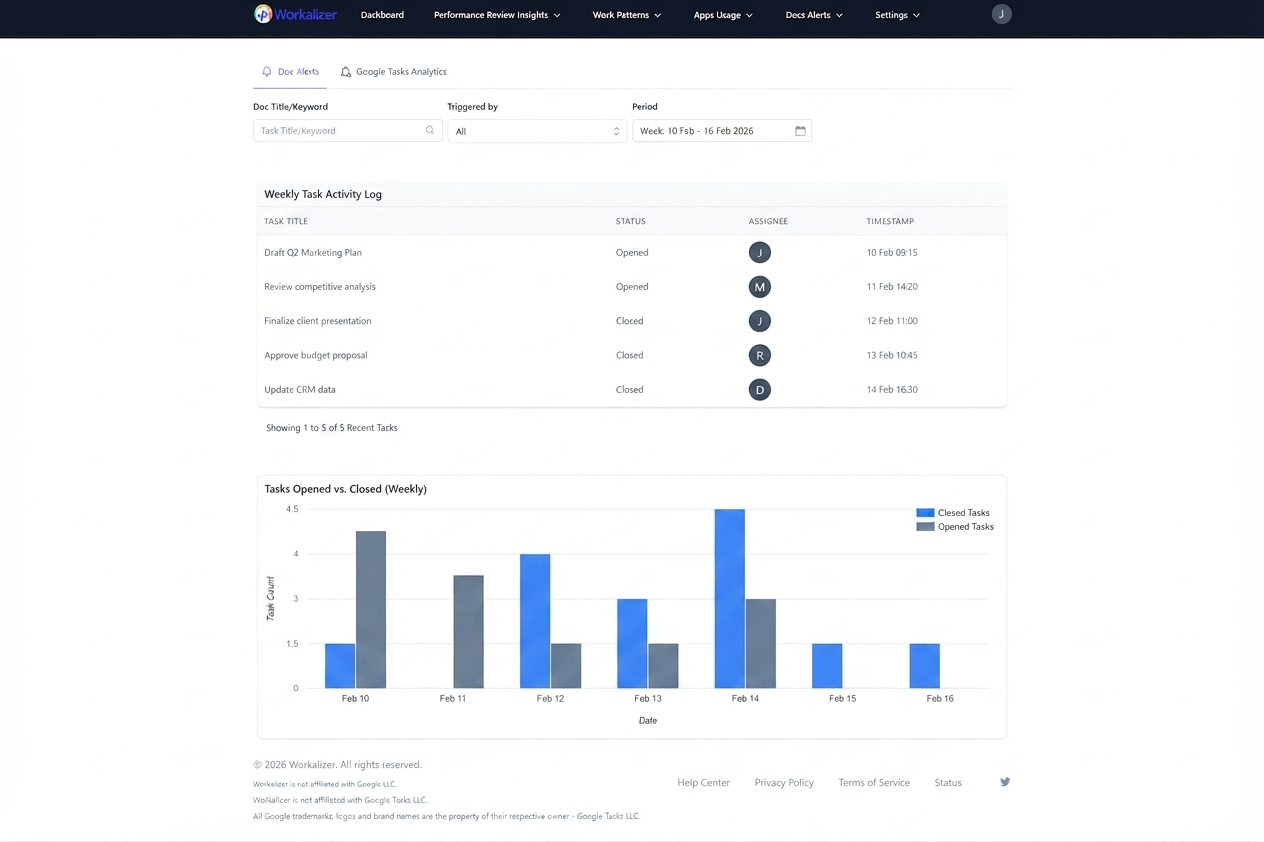
Step-by-Step Guide for Managers
- Set scope: Choose the Org Unit (department, site, or All) and Period that matches your review cycle.
- Scan the headline trend: Note whether activity is rising, flat, or uneven across teams.
- Investigate outliers: Identify people or teams with unusually high or low usage and discuss with their manager.
- Compare periods: Use week-over-week or month-over-month views before policy or process changes.
- Share next steps: Turn findings into a short action list for your leadership meeting.
Common Legal Scenarios
- During a legal program rollout, managers monitor Tasks usage to spot teams falling behind on follow-ups that affect matter confidentiality, client collaboration boundaries, and efficient case-team communication.
- Quarterly reviews: Compare google tasks usage trends across org units to align with matter confidentiality, client collaboration boundaries, and efficient case-team communication.


